HubSpot CMS Migration for a Dutch Healthcare Technology Vendor
A Dutch healthcare software company running HubSpot Starter across Marketing, Sales, and Content Hub needed to migrate its WordPress website to HubSpot CMS before year-end.
- Industry: Healthcare Software
- Company Size: Small (1-50 employees)
- Services: CMS Migration, HubSpot Content Hub Implementation, SEO Redirect Mapping
The Approach
The goals:
- Multiple website domains they wanted to redirect to one
- Consolidate analytics into a single commercial environment
- Give the internal team independent content control without developer dependency
- And restructure the site around buyer personas rather than company history.
The Challenge
1. A WordPress site disconnected from the rest of the commercial stack.
Lighthouse was running HubSpot Starter across Marketing, Sales, and Content Hub, but the website sat outside this environment on WordPress. The split meant page visits and form submissions never reached the CRM, marketing reporting required manual exports, and the sales team could not see which pages a prospect had viewed before a conversation. For a small commercial team, the friction was a daily tax on every campaign and every sales call.
2. A site structure built around company history, not buyer needs.
The existing WordPress site was organized around Lighthouse as a company. QuestManager, the product hospitals and researchers actually evaluate, was buried inside that structure. Healthcare buyers do not arrive looking for a software vendor's founding story. They arrive looking for a tool that solves a specific clinical, research, or administrative problem. The site was answering the wrong question.
3. Multi-domain migration.
Updating the WordPress site required technical involvement the internal marketing function could not sustain. They also wanted to have everything in HubSpot.
Decision Bridge
Lighthouse had already standardized on HubSpot for Marketing, Sales, and Content Hub.
Migrating the website into the same environment was the obvious move, but the work had to fit a tight calendar and a defined budget.
Elixir scoped the project as a launch-pad MVP. Elixir would build the foundation: theme installation, branding, reusable page templates, navigation, redirect mapping, training, and go-live support. The Lighthouse team would build out the pages themselves using the templates. The fixed-fee scope and 5-week core sprint structure were designed to get the site live without overcommitting on custom development the project did not need.
The Solution
1. Foundation and theme implementation
Elixir installed the GrowBig theme as the structural base and configured theme settings, navigation, footer, and global sections against the client's brand kit.
The theme choice was deliberate. GrowBig is modular enough to support buyer-persona page structures without requiring custom development, which kept the work inside MVP scope and let the internal team extend the site after go-live using only the modules already in place.
Branding elements applied from the client's brand book delivered in week one:
- Logo and favicon
- Primary and secondary color palette
- Typography (primary, body, custom fonts)
- Button styles and hover states
- Email footer and global asset library
.png?width=900&height=506&name=COVER%20BLOG%2c%20ETC%20-%20template%20(18).png)
Page templates structured around the buyer, not the company
Elixir built core page templates covering Home, Service, About, Resource/Blog, and Contact using the GrowBig module library. Available modules included:
- Hero blocks and text-and-image layouts
- Icon grids and content cards
- Testimonials and CTA bars
- Accordion FAQs and embedded forms
The information architecture decisions sat with the client, including which existing WordPress pages to carry forward and which to retire. That choice carried extra weight under HubSpot Starter, which caps a portal at 30 pages. The StoryBrand framework guided how each buyer persona's challenge and the product solution would be positioned across the templates.
Elixir handed off the templates with the client owning the copy and imagery from day one, so the site voice stayed theirs.
2. Multilanguage build
The client launched in Dutch first and planned English once the Dutch site was live. A second language roughly doubles the page count, and the English rollout pushed the site toward Starter's 30-page cap. Elixir built the English version with HubSpot language groups, which tie each Dutch page to its English equivalent and drive an accurate language switcher. DeepL handled the translation inside HubSpot, so the internal team started from a first-pass English draft to review rather than empty pages.
SEO-clean migration with full redirect mapping
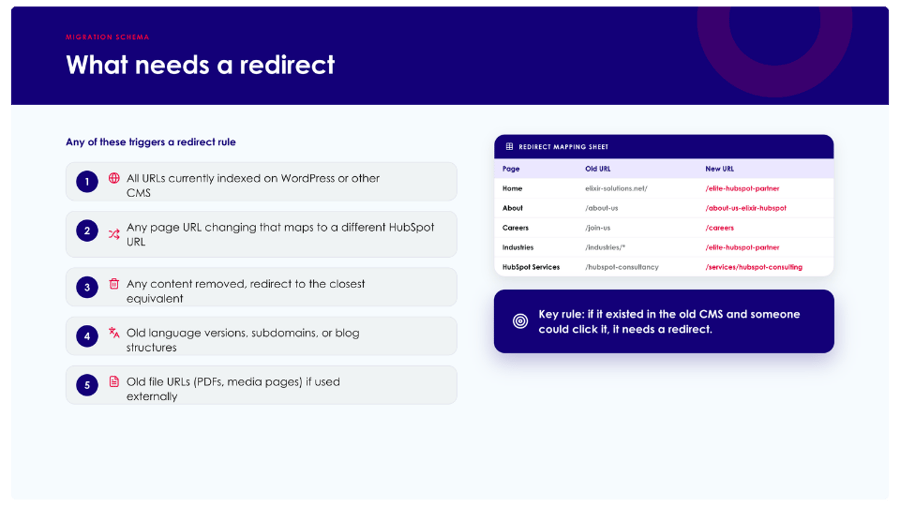
The single highest-risk part of any WordPress-to-HubSpot migration is loss of organic search authority. Elixir built a comprehensive redirect mapping file from the existing WordPress sitemap.
- Every URL change accounted for in the mapping file
- Each old URL mapped to its HubSpot equivalent before go-live
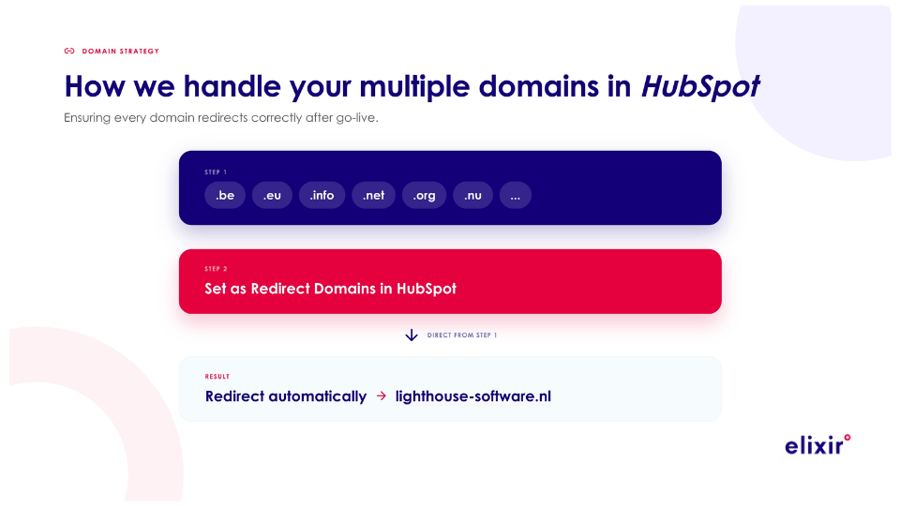
- Multi-domain configuration set up alongside the migration
- Multiple domains managed within a single HubSpot environment without splintering analytics
Why redirect mapping determines whether a CMS migration succeeds commercially
Across Elixir's CMS migration projects, the most common cause of post-migration regret is not design or template choice. It is silent SEO erosion in the first three months, because URL changes were not mapped end-to-end before go-live.
Most agencies build the new site, then handle redirects as a launch checklist item. By the time anyone notices traffic has dropped, search engines have already de-indexed pages and recovery takes six to twelve months.
Elixir sequences redirect mapping as a deliverable signed off before the new site goes live, not as a post-launch cleanup task, to prevent that failure mode. For the client, this meant mapping every WordPress URL to its HubSpot equivalent before publish, including blog posts and product pages. The day the DNS switched, the search authority moved with it rather than disappearing into a wave of 404 errors.
3. Enablement and handover
A technically clean migration the internal team cannot operate produces no commercial result. Elixir delivered training in two stages:
- Hands-on training session covering staging, modules, theme settings, and publishing
- Q&A clinic following the internal team's first independent build sprint
- Hyper care support available during the immediate post-launch window
The intent was that the client team would build their second new page without Elixir present.
The Result
The site went live on December 18, 2025.
The commercial environment is now consolidated. Page visits and form submissions appear on contact timelines in HubSpot, giving the sales team visibility into prospect behavior before outreach.
Marketing reporting runs from the same environment as deal and campaign data. This removes the manual export step from WordPress that previously sat between every report and every decision.
The internal team owns site updates and page expansion directly, without routing through a developer or external agency. The migration preserved search authority through complete redirect mapping. The information architecture moved the site from a company-history structure to a product-and-persona structure organized around the product and its four buyer audiences.
The English site launched alongside the Dutch build, with page structure consolidated to stay within the Starter environment. The team operates the platform independently, with the architecture and templates in place to add new pages as the product evolves.
Key Takeaway
A Dutch healthcare technology vendor migrated its WordPress website to HubSpot CMS in 8 weeks using Elixir's launch-pad MVP methodology, consolidating its commercial stack into a single HubSpot environment alongside Marketing, Sales, and Content Hub.
Elixir delivered the foundation: GrowBig theme implementation, branded page templates structured around buyer personas, comprehensive URL redirect mapping, multi-domain configuration, and CMS training. The internal team built the pages using the templates. The site went live on December 18, 2025 with zero loss of search authority and full internal autonomy to expand the site without developer support.
FAQ
How do you migrate a WordPress site to HubSpot CMS without losing SEO?
The single most important deliverable is a complete URL redirect mapping file, built from the WordPress sitemap and signed off before go-live. Every existing URL must map to its HubSpot equivalent so search engines route cleanly to the new site the moment DNS switches over. Most post-migration traffic loss comes from incomplete redirect maps handled as a launch checklist item rather than as a pre-launch deliverable. Sequencing matters more than tooling. In Elixir's experience guiding CMS migrations, treating the redirect file as a hard gate before go-live is the most reliable way to protect organic search baseline.
Should a B2B SaaS company run its website on HubSpot CMS if it already uses HubSpot for marketing and sales?
For most small and mid-sized organizations already running HubSpot Starter or higher, consolidating the website into the same environment is the higher-value move. The reason is data flow, not features. When the website lives outside HubSpot, page visits and form submissions do not reach the CRM, sales loses visibility into prospect behavior, and marketing reporting requires manual exports. Consolidating closes those loops. Feature comparison against WordPress is the wrong frame for the decision. The question is whether commercial data should live in one environment or two.
How do you restructure a website from company-focused to buyer-persona-focused during a CMS migration?
Use the migration as the opportunity to retire pages that exist only because of the previous structure. For Lighthouse, this meant deprioritizing company history in favor of QuestManager product pages organized around four buyer audiences: hospitals, researchers, clinicians, and patients. The StoryBrand framework is one common approach. Each page positions the buyer as the protagonist, the product as the guide, and the outcome as the clinical, research, or operational improvement the buyer is evaluating against. The information architecture decisions should sit with the client. The agency's role is to build templates that support the new structure cleanly.
What is a launch-pad MVP approach to website migration?
A scoped migration model where the agency delivers the foundation (theme installation, branded templates, redirect mapping, training, and go-live support) and the client builds out the pages using the templates. This approach works well for organizations with a hands-on internal marketing function and a defined timeline. It compresses delivery to 5 to 8 weeks, keeps the budget predictable, and leaves the internal team with full operational ownership from day one. The trade-off is that the client carries the content production load, which suits teams who want voice and copy autonomy and does not suit teams expecting a fully-built site at handover.
How long does a HubSpot CMS migration take for a small B2B company?
For a small organization with a clear sitemap, defined brand identity, and an internal team that produces content, a launch-pad MVP migration runs 5 to 8 weeks. The longer end of the range accommodates redirect mapping for sites with 20 or more URLs, multi-domain configuration, and CMS training. Larger sites, custom development requirements, multi-language scope, or complex third-party integrations extend the timeline. The constraints are content production capacity on the client side and the complexity of the existing URL structure, not the HubSpot build itself.
Why does redirect mapping fail in CMS migrations even when an agency claims to handle it?
Most failures come from sequencing, not technical execution. When redirect mapping is treated as a launch checklist item rather than a pre-launch deliverable, gaps appear in the file and silent traffic loss begins on day one. By the time the loss is visible in analytics, typically three months post-launch, search engines have already de-indexed missed pages and recovery takes six to twelve months. The fix is to treat the complete redirect file as a sign-off gate that has to clear before the new site can go live, with every old URL mapped to its new equivalent and tested in staging.
Get in touch
By partnering with Elixir, this Dutch software company did more than just migrate their website. They consolidated their commercial stack, gave their team full content autonomy, and built a digital experience structured around the buyers they serve.
If your website sits outside your CRM, your team waits on developers to publish updates, or your site speaks about your company instead of your buyer, this story shows that with the right partner and platform, there's a better way forward.

Read more customer reports:

Mondi's HubSpot x SAP C4C V2 Integration
Mondi shifted to self-service campaigns with SAP C4C V2, gaining full visibility and faster, aligned marketing and sales.
Bosch Rexroth overcame commercial department disconnection and gained unified customer visibility with HubSpot and SAP C4C integration.